
Header Ads Widget

header ads

Download OpenThos Android OS 8.1.0 for PC


OpenThos Android OS 8.1.0 Free Download For PC Desktop No Google Services
NO GOOGLE SERVICES
Version
8.1.0
Base
Android-x86
Size
937 MB
Boot
UEFI
Tech Decode > PC Tools > Android OS
Open Source Desktop OS

OpenThos Android OS 8.1.0 - PC Download

A Google-free Android-x86 desktop OS with a real multi-window manager and full disk encryption

MULTI-WINDOW
NO GOOGLE SERVICES
OPEN SOURCE
Android OS
Desktop GUI
Privacy Focused
2026
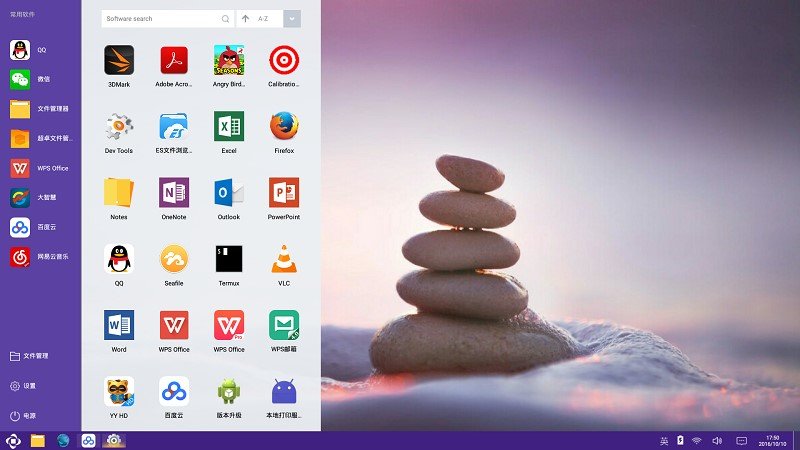
OpenThos is a free, open-source desktop operating system built on top of Android-x86. Instead of copying the phone-style single-app layout most Android-on-PC projects use, it's built from the ground up around a real desktop metaphor — a taskbar, a start menu, a file manager, and proper multi-window support — while deliberately leaving Google Mobile Services out of the build entirely.
Developer
OpenThos.org
Base Project
Android-x86
License
Apache 2.0
What Is OpenThos

OpenThos takes the Android-x86 codebase and rebuilds the interface layer around desktop conventions rather than phone conventions. Where most Android-on-PC projects (Bliss OS, Phoenix OS, Tesla) still feel like a phone UI stretched onto a monitor, OpenThos ships a genuine taskbar, a Windows-style start menu with a sorted app list, and a file manager built for keyboard-and-mouse use from the start.

The bigger difference is what's not included — this build has no Google Mobile Services baked in, so there's no Play Store dependency and no background Google account requirement. That makes it a fit for anyone who wants an Android-based desktop specifically without Google in the loop, though it also means installing APKs manually rather than through a store.

Security-wise, OpenThos leans on full disk encryption, per-app permission controls, and application isolation — features aimed at treating this as a real daily-use desktop OS rather than a throwaway test environment, with the project listing UEFI boot support and multiple-install compatibility on one machine.

Key Features
Real Multi-Window Manager
Run and resize multiple Android apps side by side, not one at a time.
No Google Services
Ships without GMS — no forced Play Store login or background Google tracking.
Full Disk Encryption
System-level encryption plus granular per-app permission controls.
Taskbar & Start Menu
A genuine desktop shell with a sorted, searchable app list.
Built-In File Manager
Keyboard-and-mouse file browsing designed for a desktop workflow.
UEFI Boot Support
Boots on modern UEFI firmware, with support for multiple installs on one drive.
How To Install
NOTE: This is an IMG file, not an ISO — flash it directly to a USB drive with Rufus or BalenaEtcher (select "DD Image" mode in Rufus).
1
Download the IMG file using Server 1 or Server 2 above.
2
Flash it to a USB drive using Rufus in DD Image mode or BalenaEtcher — minimum 4GB USB stick.
3
Boot from the USB through your PC's boot menu (usually F12, F11, or Esc at startup).
4
Choose Live or Install — Live runs it from the USB, Install writes it permanently to your drive.
5
Set your local username during setup — no Google account is required.
System Requirements
CPU
x86_64 dual-core or better
RAM
2 GB minimum, 4 GB recommended
Storage
8 GB free space minimum
Boot Mode
UEFI (Legacy support limited)
Software Information
NameOpenThos
Version8.1.0 (Build 191102)
DeveloperOpenThos.org
Base ProjectAndroid-x86 / AOSP
Google ServicesNot Included
File FormatIMG
File Size937.4 MB
LicenseApache 2.0 (Open Source)
Keywords
openthos download
openthos android os
openthos 8.1.0
openthos for pc
android os without google
android desktop os open source
android x86 no gapps
tech decode openthos
DISCLAIMER: OpenThos is a free, open-source project. This post links to the official image for informational and download convenience purposes only. Documentation for this project is limited, so some setup steps may require extra troubleshooting. Always verify hardware compatibility before installing to a physical drive.

Post a Comment

0 Comments